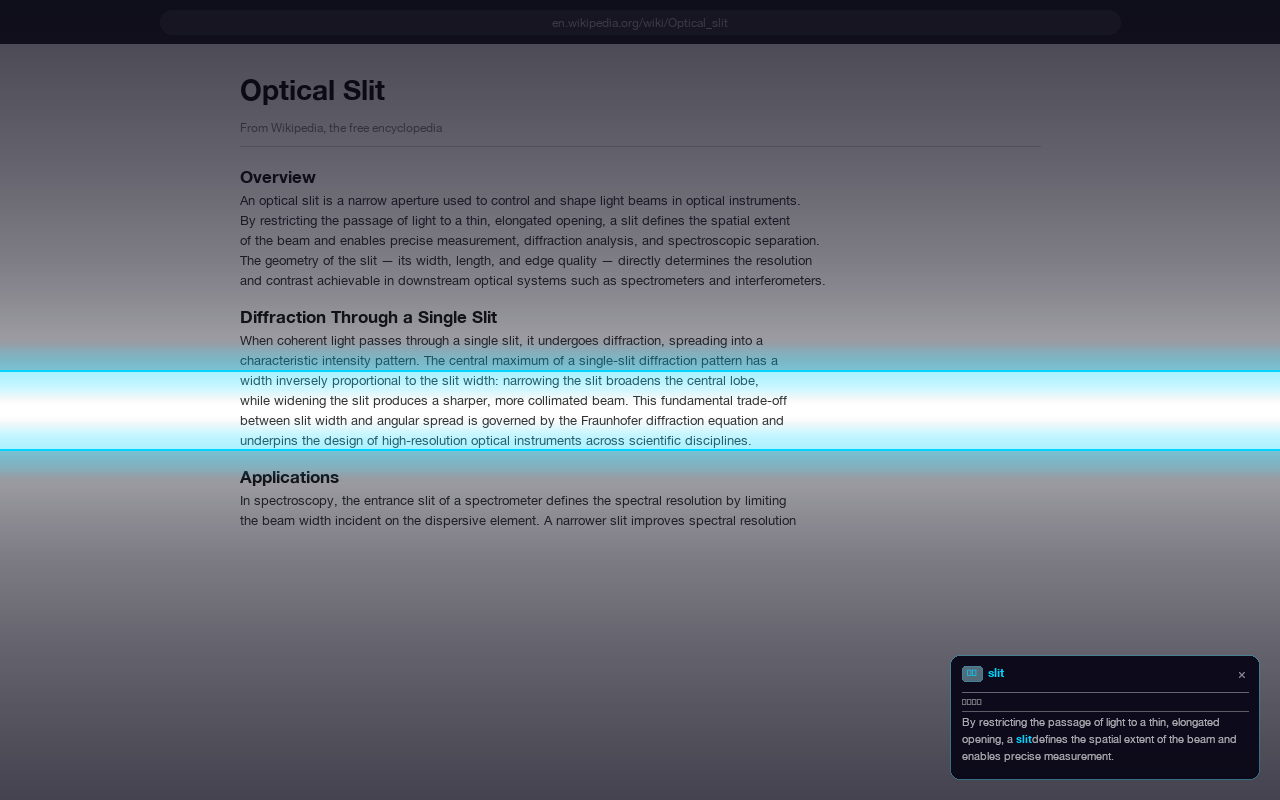
A precision reading ruler for papers, PDFs, and web pages. Inspired by the optical slit — isolate one line, silence the rest.
Works on all websites · PDF support · No sign-in required
Designed for researchers, students, and anyone who reads long-form documents seriously.
A frosted-glass slit that isolates the line you're reading. The surrounding text fades into a blurred dark overlay — reducing visual noise without hiding context.
Works seamlessly on web pages and local PDF files. Move the ruler with keyboard shortcuts, even inside Chrome's native PDF viewer.
Copy a term or definition and FocusRuler surfaces every occurrence in context as you read. Never lose track of a concept introduced pages ago.
Adjust ruler height, blur intensity, overlay darkness, and accent colour. Your settings sync across Chrome profiles automatically.
Toggle, move, and resize the ruler entirely from the keyboard. Use Alt+R to activate, arrow keys to move — without touching the mouse.
FocusRuler runs entirely on your device. No analytics, no tracking, no external requests. What you read stays private.
Copy any term while reading — FocusRuler saves it and quietly watches for it as you scroll. When the same word appears again, the panel surfaces the exact sentence where you first encountered it.
Perfect for dense academic papers where a definition on page 2 becomes critical on page 14.
Every action is reachable from the keyboard — no mouse required once you're in reading mode.
Toggle ruler on / off
Move ruler up (PDF-compatible)
Move ruler down (PDF-compatible)
Resize ruler height
Save term to Text Echo
Free to install. Works immediately — no account, no setup.
Add to Chrome — It's Free